Page 2 of 2 FirstFirst 1 2
Results 26 to 45 of 45
  1. #26
    Da Dragonball Kid L.J.'s Avatar
    Join Date
    Aug 2005
    Location
    Posted in da cut
    Posts
    3,577
    Quote Originally Posted by Sir Terrence the Terrible
    I am trying to stream tunes from my Itunes folder, and it may not be possible without conversion to MP3, is that right? I see the folder fine, I just don't see the individual tracks.
    You should try streaming one of the supported formats just to make sure it's working ok.


    What media formats are currently supported?
    The current version is designed such that almost anything you can play on Windows Media Player, whether it resides locally on your computer or located on the Internet, should also play on any of the supported devices, despite the fact that these devices do not natively support many of these media formats. You can also play Quicktime video and Real Media videos (including rmvb), however for the time being you cannot stream Quicktime or Real from the Internet. To give a more precise definition, any media format that has a Directshow decoder will work with TVersity as long as you have the directshow decoder installed, this includes:

    * WMA, WMV, MJPEG, DVR-MS, AVI (including Divx3/4/5/6, Xvid, and others)
    * MPEG1/2/4 (including H.264), MP3 and AAC
    * Qucktime MOV
    * Real Video/Audio/RMVB
    * OGG Vorbis and OGM
    * FLAC, WMA lossless, Monkey Audio (APE), Musepack Audio (MPC) and Wavpack
    * Flash Video
    * Matroska (MKA and MKV)
    * Karaoke CDG/BIN
    Last edited by L.J.; 11-05-2009 at 03:48 PM.

  2. #27
    M.P.S.E /AES/SMPTE member Sir Terrence the Terrible's Avatar
    Join Date
    Jul 2002
    Posts
    6,826
    Quote Originally Posted by L.J.
    You should try streaming one of the supported formats just to make sure it's working ok.


    What media formats are currently supported?
    The current version is designed such that almost anything you can play on Windows Media Player, whether it resides locally on your computer or located on the Internet, should also play on any of the supported devices, despite the fact that these devices do not natively support many of these media formats. You can also play Quicktime video and Real Media videos (including rmvb), however for the time being you cannot stream Quicktime or Real from the Internet. To give a more precise definition, any media format that has a Directshow decoder will work with TVersity as long as you have the directshow decoder installed, this includes:

    * WMA, WMV, MJPEG, DVR-MS, AVI (including Divx3/4/5/6, Xvid, and others)
    * MPEG1/2/4 (including H.264), MP3 and AAC
    * Qucktime MOV
    * Real Video/Audio/RMVB
    * OGG Vorbis and OGM
    * FLAC, WMA lossless, Monkey Audio (APE), Musepack Audio (MPC) and Wavpack
    * Flash Video
    * Matroska (MKA and MKV)
    * Karaoke CDG/BIN
    Okay L.J., everything is working perfectly now. Thank you big time for all of your help. Now I have to pass this information off to all of the folks I talked into buying a PS3. My best friend told me not to think of planning anything this weekend until I get him hooked up!

    You are a PS3 genius!
    Sir Terrence

    Titan Reference 3D 1080p projector
    200" SI Black Diamond II screen
    Oppo BDP-103D
    Datastat RS20I audio/video processor 12.4 audio setup
    9 Onkyo M-5099 power amp
    9 Onkyo M-510 power amp
    9 Onkyo M-508 power amp
    6 custom CAL amps for subs
    3 custom 3 way horn DSP hybrid monitors
    18 custom 3 way horn DSP hybrid surround/ceiling speakers
    2 custom 15" sealed FFEC servo subs
    4 custom 15" H-PAS FFEC servo subs
    THX Style Baffle wall

  3. #28
    Suspended
    Join Date
    Apr 2004
    Location
    Out there
    Posts
    6,777
    Did you pay your consulting fee yet like I had to?

  4. #29
    Da Dragonball Kid L.J.'s Avatar
    Join Date
    Aug 2005
    Location
    Posted in da cut
    Posts
    3,577
    Quote Originally Posted by Sir Terrence the Terrible
    Okay L.J., everything is working perfectly now. Thank you big time for all of your help. Now I have to pass this information off to all of the folks I talked into buying a PS3. My best friend told me not to think of planning anything this weekend until I get him hooked up!

    You are a PS3 genius!
    Hey cool man!

    I still listen to CD's, but there's nothing like having access to my entire music collection with just a few clicks

    I'm still convinced that the PS3 is by far one of the best HT purchases I've made.


    Quote Originally Posted by Rich
    Did you pay your consulting fee yet like I had to?

  5. #30
    M.P.S.E /AES/SMPTE member Sir Terrence the Terrible's Avatar
    Join Date
    Jul 2002
    Posts
    6,826
    Quote Originally Posted by L.J.
    Hey cool man!

    I still listen to CD's, but there's nothing like having access to my entire music collection with just a few clicks

    I'm still convinced that the PS3 is by far one of the best HT purchases I've made.


    One more question (and we'll discuss the fee), can the PS3 be made to stream Youtube video? I know it can do Hulu, as I got mine hooked into that. I know TVersity has a ICON for YouTube, but how does it work?

    By the way, you are right. As much really great equipment as I own, the PS3 has shown itself to be the most fullproof, flexible, competent performer and worth every dollar I paid for it.
    Sir Terrence

    Titan Reference 3D 1080p projector
    200" SI Black Diamond II screen
    Oppo BDP-103D
    Datastat RS20I audio/video processor 12.4 audio setup
    9 Onkyo M-5099 power amp
    9 Onkyo M-510 power amp
    9 Onkyo M-508 power amp
    6 custom CAL amps for subs
    3 custom 3 way horn DSP hybrid monitors
    18 custom 3 way horn DSP hybrid surround/ceiling speakers
    2 custom 15" sealed FFEC servo subs
    4 custom 15" H-PAS FFEC servo subs
    THX Style Baffle wall

  6. #31
    Da Dragonball Kid L.J.'s Avatar
    Join Date
    Aug 2005
    Location
    Posted in da cut
    Posts
    3,577
    Quote Originally Posted by Sir Terrence the Terrible
    One more question (and we'll discuss the fee), can the PS3 be made to stream Youtube video? I know it can do Hulu, as I got mine hooked into that. I know TVersity has a ICON for YouTube, but how does it work?

    By the way, you are right. As much really great equipment as I own, the PS3 has shown itself to be the most fullproof, flexible, competent performer and worth every dollar I paid for it.
    You can access Youtube directly from the PS3 browser. I haven't tried streaming it through Tversity but I'll give it a try out of curiosity.

  7. #32
    Da Dragonball Kid L.J.'s Avatar
    Join Date
    Aug 2005
    Location
    Posted in da cut
    Posts
    3,577
    OK, gave it a try and it works fine. Gotta set a few things up but I'm thinking playlists, favorites and stuff like that can be set up for easy access. Still toying with it but I got it to work right away so that's a plus. I skipped the Youtube username log in during Tversity installation, now I can't find where to enter that info. Besides that, I could access a bunch of videos based on different categories such as "most viewed, highest ratings....and so on". Each feed needs to have its own unique title to keep things organized. Also, each category pulls up about 15 videos. Not sure if that's the limit or what.

    This would come in handy for repeated watching, but the PS3 browser would be easier for finding a quick video or two.

  8. #33
    M.P.S.E /AES/SMPTE member Sir Terrence the Terrible's Avatar
    Join Date
    Jul 2002
    Posts
    6,826
    Quote Originally Posted by L.J.
    OK, gave it a try and it works fine. Gotta set a few things up but I'm thinking playlists, favorites and stuff like that can be set up for easy access. Still toying with it but I got it to work right away so that's a plus. I skipped the Youtube username log in during Tversity installation, now I can't find where to enter that info. Besides that, I could access a bunch of videos based on different categories such as "most viewed, highest ratings....and so on". Each feed needs to have its own unique title to keep things organized. Also, each category pulls up about 15 videos. Not sure if that's the limit or what.

    This would come in handy for repeated watching, but the PS3 browser would be easier for finding a quick video or two.
    I also got it working, and I got my Netflix disc as well. Downloads suck, they just make Blu-rays look just that much better. I love my PS3
    Sir Terrence

    Titan Reference 3D 1080p projector
    200" SI Black Diamond II screen
    Oppo BDP-103D
    Datastat RS20I audio/video processor 12.4 audio setup
    9 Onkyo M-5099 power amp
    9 Onkyo M-510 power amp
    9 Onkyo M-508 power amp
    6 custom CAL amps for subs
    3 custom 3 way horn DSP hybrid monitors
    18 custom 3 way horn DSP hybrid surround/ceiling speakers
    2 custom 15" sealed FFEC servo subs
    4 custom 15" H-PAS FFEC servo subs
    THX Style Baffle wall

  9. #34
    Da Dragonball Kid L.J.'s Avatar
    Join Date
    Aug 2005
    Location
    Posted in da cut
    Posts
    3,577
    Quote Originally Posted by Sir Terrence the Terrible
    I also got it working, and I got my Netflix disc as well. Downloads suck, they just make Blu-rays look just that much better. I love my PS3
    Man , I didn't even know PS3 could stream Netflix now. Where have I been

    So quality may be bad but my wife & kids ain't gonna care. More use out of my PS3s and gettin more value out of my Netflix account

    Guess the disc is needed til a future update allowing streaming directly from the XMB. Come on T, you need to keep us slackers updated. I been too busy playing Resident Evil 5

  10. #35
    M.P.S.E /AES/SMPTE member Sir Terrence the Terrible's Avatar
    Join Date
    Jul 2002
    Posts
    6,826
    It seems that Hulu has blocked the PS3 from accessing its content. I found a work around, but it is difficult to implement, and not for the faint at heart. When I finally did get it to work, the results are pretty mediocre. I think bandwidth is the issue, as I only have a 6.0mbps DSL connection, hardly the speed you get with cable.

    I also found there was content on YouTube that cannot be accessed by the PS3. It seems they have a block on some content that the PS3 cannot access. I can get it fine on my computer, but not on the PS3. The workaround, I downloaded it to my hard drive, and was able to stream from there.
    Sir Terrence

    Titan Reference 3D 1080p projector
    200" SI Black Diamond II screen
    Oppo BDP-103D
    Datastat RS20I audio/video processor 12.4 audio setup
    9 Onkyo M-5099 power amp
    9 Onkyo M-510 power amp
    9 Onkyo M-508 power amp
    6 custom CAL amps for subs
    3 custom 3 way horn DSP hybrid monitors
    18 custom 3 way horn DSP hybrid surround/ceiling speakers
    2 custom 15" sealed FFEC servo subs
    4 custom 15" H-PAS FFEC servo subs
    THX Style Baffle wall

  11. #36
    Forum Regular Woochifer's Avatar
    Join Date
    Dec 2001
    Location
    SF Bay Area
    Posts
    6,883
    Quote Originally Posted by Sir Terrence the Terrible
    It seems that Hulu has blocked the PS3 from accessing its content. I found a work around, but it is difficult to implement, and not for the faint at heart. When I finally did get it to work, the results are pretty mediocre. I think bandwidth is the issue, as I only have a 6.0mbps DSL connection, hardly the speed you get with cable.
    Hulu got blocked from the Vudu boxes and all smartphones as well. Now that Hulu has successfully corralled a dedicated group of regular viewers, that service is now getting pitched around as a bargaining chip. There's talk about walling off certain content only for cable and satellite subscribers, and even talk about going to a subscription model to access certain programming on the site. They built up the viewership with free content, now they want to make money off of that audience.

    Seems that a lot of these online video services are just trying to build up a core audience, so that the parent companies can use them as leverage when negotiating with service providers and hardware manufacturers. ESPN360 has been playing hardball. They even got one of my relatives to switch ISPs when his cable internet could not access ESPN360's programming and the site told him to switch to AT&T, which apparently pays ESPN a fee to allow their subscribers access to ESPN360 programming.
    Wooch's Home Theater 2.0 (Pics)
    Panasonic VIERA TH-C50FD18 50" 1080p
    Paradigm Reference Studio 40, CC, and 20 v.2
    Adire Audio Rava (EQ: Behringer Feedback Destroyer DSP1124)
    Yamaha RX-A1030
    Dual CS5000 (Ortofon OM30 Super)
    Sony UBP-X800
    Sony Playstation 3 (MediaLink OS X Server)
    Sony ES SCD-C2000ES
    JVC HR-S3912U
    Directv HR44 and WVB
    Logitech Harmony 700
    iPhone 5s/iPad 3
    Linksys WES610


    The Neverending DVD/BD Collection

    Subwoofer Setup and Parametric EQ Results *Dead Link*

  12. #37
    Da Dragonball Kid L.J.'s Avatar
    Join Date
    Aug 2005
    Location
    Posted in da cut
    Posts
    3,577
    Quote Originally Posted by Sir Terrence the Terrible
    It seems that Hulu has blocked the PS3 from accessing its content. I found a work around, but it is difficult to implement, and not for the faint at heart. When I finally did get it to work, the results are pretty mediocre. I think bandwidth is the issue, as I only have a 6.0mbps DSL connection, hardly the speed you get with cable.

    I also found there was content on YouTube that cannot be accessed by the PS3. It seems they have a block on some content that the PS3 cannot access. I can get it fine on my computer, but not on the PS3. The workaround, I downloaded it to my hard drive, and was able to stream from there.
    Yes I need to make some changes myself. I have the 6.0 dsl as well. Router runs directly to my PS3 but wireless to my desktop. I may just switch over to Comcast internet and run wire directly to my PC ( easier said than done). Wish Comcast didn't charge a arm n' leg for internet service.

    My brother has Comcast and his connection is lightning fast

  13. #38
    M.P.S.E /AES/SMPTE member Sir Terrence the Terrible's Avatar
    Join Date
    Jul 2002
    Posts
    6,826
    More information I received from my friend. The PS3 can be firware upgraded to 3D viewing of Blurays. It will not be full resolution because of the limitations of the PS3's 1.3 HDMI transmitter, but you will get 960x1080p 3D instead of 1920x1080p 3D. Even half resolution 3D looks really good and sharp based on the Sony demo I saw while attending Blu-con 2.0.

    This IMO is great news for PS3 owners.
    Sir Terrence

    Titan Reference 3D 1080p projector
    200" SI Black Diamond II screen
    Oppo BDP-103D
    Datastat RS20I audio/video processor 12.4 audio setup
    9 Onkyo M-5099 power amp
    9 Onkyo M-510 power amp
    9 Onkyo M-508 power amp
    6 custom CAL amps for subs
    3 custom 3 way horn DSP hybrid monitors
    18 custom 3 way horn DSP hybrid surround/ceiling speakers
    2 custom 15" sealed FFEC servo subs
    4 custom 15" H-PAS FFEC servo subs
    THX Style Baffle wall

  14. #39
    Forum Regular audio amateur's Avatar
    Join Date
    Mar 2006
    Location
    France
    Posts
    2,524
    Quote Originally Posted by Sir Terrence the Terrible
    More information I received from my friend. The PS3 can be firware upgraded to 3D viewing of Blurays. It will not be full resolution because of the limitations of the PS3's 1.3 HDMI transmitter, but you will get 960x1080p 3D instead of 1920x1080p 3D. Even half resolution 3D looks really good and sharp based on the Sony demo I saw while attending Blu-con 2.0.

    This IMO is great news for PS3 owners.
    That would mean about 9/10 aspect ratio. What's up with that?

  15. #40
    M.P.S.E /AES/SMPTE member Sir Terrence the Terrible's Avatar
    Join Date
    Jul 2002
    Posts
    6,826
    Quote Originally Posted by audio amateur
    That would mean about 9/10 aspect ratio. What's up with that?
    That would be two identical streams of 960x1080, one stream for each eye so it will take up the entire 16x9 screen. When combined with the eye, it will come out as 1920x1080p.
    Sir Terrence

    Titan Reference 3D 1080p projector
    200" SI Black Diamond II screen
    Oppo BDP-103D
    Datastat RS20I audio/video processor 12.4 audio setup
    9 Onkyo M-5099 power amp
    9 Onkyo M-510 power amp
    9 Onkyo M-508 power amp
    6 custom CAL amps for subs
    3 custom 3 way horn DSP hybrid monitors
    18 custom 3 way horn DSP hybrid surround/ceiling speakers
    2 custom 15" sealed FFEC servo subs
    4 custom 15" H-PAS FFEC servo subs
    THX Style Baffle wall

  16. #41
    Forum Regular audio amateur's Avatar
    Join Date
    Mar 2006
    Location
    France
    Posts
    2,524
    Oh, thanks for clearing that up. I thought we'd gone from widescreen to tallscreen.

  17. #42
    Da Dragonball Kid L.J.'s Avatar
    Join Date
    Aug 2005
    Location
    Posted in da cut
    Posts
    3,577
    Quote Originally Posted by Sir Terrence the Terrible
    This IMO is great news for PS3 owners.
    Wow, the updates just keep coming. I remember my 60g being at version 1.30 when I first hooked it up. People come to my house and are always amazed at what the PS3 can do. And some of these people own a PS3 themselves.

  18. #43
    Class of the clown GMichael's Avatar
    Join Date
    Apr 2005
    Location
    Anywhere but here...
    Posts
    13,243
    Quote Originally Posted by Sir Terrence the Terrible
    More information I received from my friend. The PS3 can be firware upgraded to 3D viewing of Blurays. It will not be full resolution because of the limitations of the PS3's 1.3 HDMI transmitter, but you will get 960x1080p 3D instead of 1920x1080p 3D. Even half resolution 3D looks really good and sharp based on the Sony demo I saw while attending Blu-con 2.0.

    This IMO is great news for PS3 owners.
    Keep it coming T. It just keeps getting better.
    WARNING! - The Surgeon General has determined that, time spent listening to music is not deducted from one's lifespan.

  19. #44
    Da Dragonball Kid L.J.'s Avatar
    Join Date
    Aug 2005
    Location
    Posted in da cut
    Posts
    3,577

    Update 3.15 Coming Soon

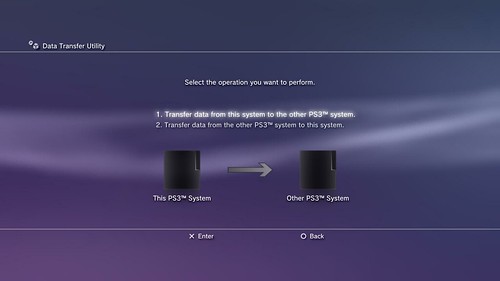
    PS3 Data Transfer:


    This feature enables you to easily transfer all of your saved data from one PS3 to another. So if you decide to get a new PS3 you can make sure you don’t loose any of your existing content. Content such as games, game save data, and videos downloaded from PlayStation Network can be transferred to the new PS3 system and deleted from the current PS3. Other content, including personal media files (photos, music, videos), can be copied onto the new PS3 and remain on the current PS3 system.

    The process is really simple

    1. Turn both the current PS3 (A) and new PS3 (B) on and connect them with a LAN cable; PS3 (A) should be connected to the TV
    2. On the XMB of PS3 (A), scroll to the Settings menu and select [System Settings] and then [Data Transfer Utility]
    3. Follow the instructions on-screen and transfer data
    4. After transferring the data, follow the instructions on-screen, and then connect PS3 (B) to the TV to view the XMB
    5. If content that was downloaded from PlayStation Store was transferred as part of this operation, you must activate PS3 (B) before you can use the data. Log in to the PS3 system as the user who owns the content, and then select (PlayStation Network) > (Account Management) > (System Activation) to activate the system

  20. #45
    Class of the clown GMichael's Avatar
    Join Date
    Apr 2005
    Location
    Anywhere but here...
    Posts
    13,243
    Good news for anyone replacing their PS/3's.
    WARNING! - The Surgeon General has determined that, time spent listening to music is not deducted from one's lifespan.

Page 2 of 2 FirstFirst 1 2

Thread Information

Users Browsing this Thread

There are currently 1 users browsing this thread. (0 members and 1 guests)

Posting Permissions

  • You may not post new threads
  • You may not post replies
  • You may not post attachments
  • You may not edit your posts
  •