Results 1 to 17 of 17

Hybrid View

  1. #1
    Suspended Smokey's Avatar
    Join Date
    Jan 2004
    Location
    Ozarks
    Posts
    3,959

    Native resolution for browsers

    I was wondering what is native resolution for browsers such as IE, Firefox or Chrome?

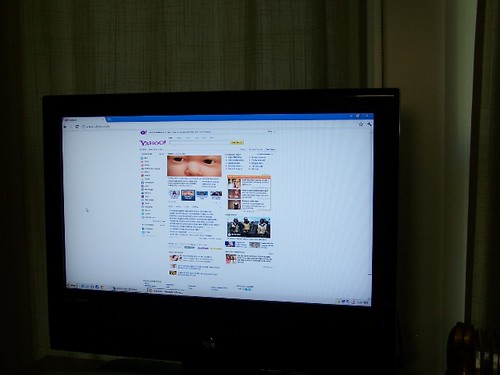
    The reason asking is since I have hooked up PC to my TV (720p), the resolution setting 1360x768 will completely fill TV screen horizontally without the need for scrolling from left to right to see the whole web pages.

    Now, if we have a 1080p TV and set the PC resolution to 1920x1080 which make web pages look smaller, will the browser still fill the whole screen. Or are we going to have side bars?

    Inquiry minds wants to know

  2. #2
    Retro Modernist 02audionoob's Avatar
    Join Date
    Jun 2008
    Location
    Dallas, TX
    Posts
    2,908
    I fit my browser window to the screen and then zoom in or out by holding CTRL and turning the mouse wheel until it's the size I want. I've always been able to make the side bars go away. But those are based on the web page rather than the browser.

  3. #3
    Oldest join date recoveryone's Avatar
    Join Date
    Jan 1970
    Location
    California
    Posts
    1,435
    Its not the res of the browser, but your screen. In some TV's the RGB port is set to certain res it will support, but you can adjust the font size of the browser which will make a small difference in how much of the page can be seen. You can also use the page percentage (50%-500%..etc) to adjust the size of the page you view. Best way to find out is to read the manual and see what pc resolution does it support. Also make sure your video card can produce those same resolutions (most system within the last 10yrs can)
    HT
    Pioneer Elite SC lx502
    Pioneer Elite N50
    Pioneer Cassette CTM66R
    Pioneer Elite BDP 85FD

    Vizio P series 2160p
    Panamax 5300 EX

  4. #4
    Retro Modernist 02audionoob's Avatar
    Join Date
    Jun 2008
    Location
    Dallas, TX
    Posts
    2,908
    Or you can just use the zoom feature until the page fills the browser the way you want it to.

  5. #5
    Suspended Smokey's Avatar
    Join Date
    Jan 2004
    Location
    Ozarks
    Posts
    3,959
    Thanks 02audionoob and recoveryone

    I did play with with browser's zoom feature and no matter what settings I use, the web browser still retained its 16:9 ratio which I think answered my question. I was guessing that browser ratio would change with different resolution setting, but it seem the 16:9 ratio stay the same and only thing that changed was web pages lay out.

    I am guessing they design most web pages based on 1360x768 ratio since at that resolution, one don't have to use the bottom scroller to to see the whole page horizontally. Any lower resolution and one have to use to mouse to move page from right to left to see the whole page.

  6. #6
    Forum Regular pixelthis's Avatar
    Join Date
    Apr 2007
    Location
    tuscaloosa
    Posts
    5,528

    Cool

    Quote Originally Posted by Smokey View Post
    Thanks 02audionoob and recoveryone

    I did play with with browser's zoom feature and no matter what settings I use, the web browser still retained its 16:9 ratio which I think answered my question. I was guessing that browser ratio would change with different resolution setting, but it seem the 16:9 ratio stay the same and only thing that changed was web pages lay out.

    I am guessing they design most web pages based on 1360x768 ratio since at that resolution, one don't have to use the bottom scroller to to see the whole page horizontally. Any lower resolution and one have to use to mouse to move page from right to left to see the whole page.
    Don't know what they design web pages to show, but 1360x768
    is the native res of your 720p set, and its what you need to set your computer at, doesn't matter what your website is, the res
    of your computer is going to be 1360x768, and everything will
    be at that res, even 1080p material will be downrezed.
    BASICALLY every set these days is a computer monitor,
    and has a res they sell it at in the store(*720 for instance) but the
    computer res is 1360x768. A 1080p is 1920x1080, I believe.
    Attached Images Attached Images  
    LG 42", integra 6.9, B&W 602s2, CC6 center, dm305rears, b&w
    sub asw2500
    Panny DVDA player
    sharp Aquos BLU player
    pronto remote, technics antique direct drive TT
    Samsung SACD/DVDA player
    emotiva upa-2 two channel amp

  7. #7
    Suspended Smokey's Avatar
    Join Date
    Jan 2004
    Location
    Ozarks
    Posts
    3,959
    Quote Originally Posted by pixelthis View Post
    BASICALLY every set these days is a computer monitor, and has a res they sell it at in the store(*720 for instance) but the computer res is 1360x768. A 1080p is 1920x1080, I believe.
    The highest resolution from my PC graphic card is 1360x768. There are no higher resolution setting. I wonder whether graphic card is capable doing 1920x1080 resolution if I hook up the PC to 1080p TV via VGA.

    Quote Originally Posted by 02audionoob
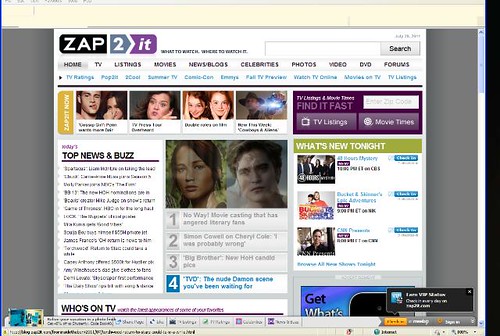
    Is this the type of sidebar you mean?

    That is excatly what I mean. For example look at the following site. With my browser zoom at 100% (no zooming), there are side bars on this web site.

    http://www.zap2it.com/

  8. #8
    Retro Modernist 02audionoob's Avatar
    Join Date
    Jun 2008
    Location
    Dallas, TX
    Posts
    2,908
    Yes...It looks like that page has a fixed width. You can zoom in on it, but the "100%" setting in IE has what appear like bars because their design is apparently designed for 768 pixels, like you said earlier. Here's mine at 100% on a 1280 x 1024 monitor:


    These are mine while zooming in Firefox, which doesn't appear to have a 100% setting, as far as I call tell.


  9. #9
    Oldest join date recoveryone's Avatar
    Join Date
    Jan 1970
    Location
    California
    Posts
    1,435
    As I stated before, its not the browser, its your display, you have it set to 16X9, so everything will be stretched to fit that format. If you go into the display settings for that input and tell it to show in 4:3 you will get a different look.
    HT
    Pioneer Elite SC lx502
    Pioneer Elite N50
    Pioneer Cassette CTM66R
    Pioneer Elite BDP 85FD

    Vizio P series 2160p
    Panamax 5300 EX

  10. #10
    Retro Modernist 02audionoob's Avatar
    Join Date
    Jun 2008
    Location
    Dallas, TX
    Posts
    2,908
    Quote Originally Posted by Smokey View Post
    I was wondering what is native resolution for browsers such as IE, Firefox or Chrome?

    The reason asking is since I have hooked up PC to my TV (720p), the resolution setting 1360x768 will completely fill TV screen horizontally without the need for scrolling from left to right to see the whole web pages.

    Now, if we have a 1080p TV and set the PC resolution to 1920x1080 which make web pages look smaller, will the browser still fill the whole screen. Or are we going to have side bars?

    Inquiry minds wants to know
    Is this the type of sidebar you mean?


  11. #11
    Retro Modernist 02audionoob's Avatar
    Join Date
    Jun 2008
    Location
    Dallas, TX
    Posts
    2,908
    To make snapshots I use the screen clip feature in a Microsoft application called OneNote. It came with my Word/Excel/PowerPoint package. It's a handy tool.

  12. #12
    Suspended Smokey's Avatar
    Join Date
    Jan 2004
    Location
    Ozarks
    Posts
    3,959
    Quote Originally Posted by 02audionoob View Post
    To make snapshots I use the screen clip feature in a Microsoft application called OneNote. It came with my Word/Excel/PowerPoint package. It's a handy tool.
    Thanks for info. I will make note of that.

Thread Information

Users Browsing this Thread

There are currently 1 users browsing this thread. (0 members and 1 guests)

Posting Permissions

  • You may not post new threads
  • You may not post replies
  • You may not post attachments
  • You may not edit your posts
  •